













For Joomla Photographers

The Joomla photo proofing platform built for photographers who refuse to rent their workflow.

Share password-protected galleries, let clients pick their favourites with a single tap, and get the order in your inbox. No monthly fees, no commission, no third party between you and your client. Just Joomla, your domain, your photos.
Joomla 5 & 6 Self-hosted, GDPR-friendly 1 year updates & support Unlimited installations
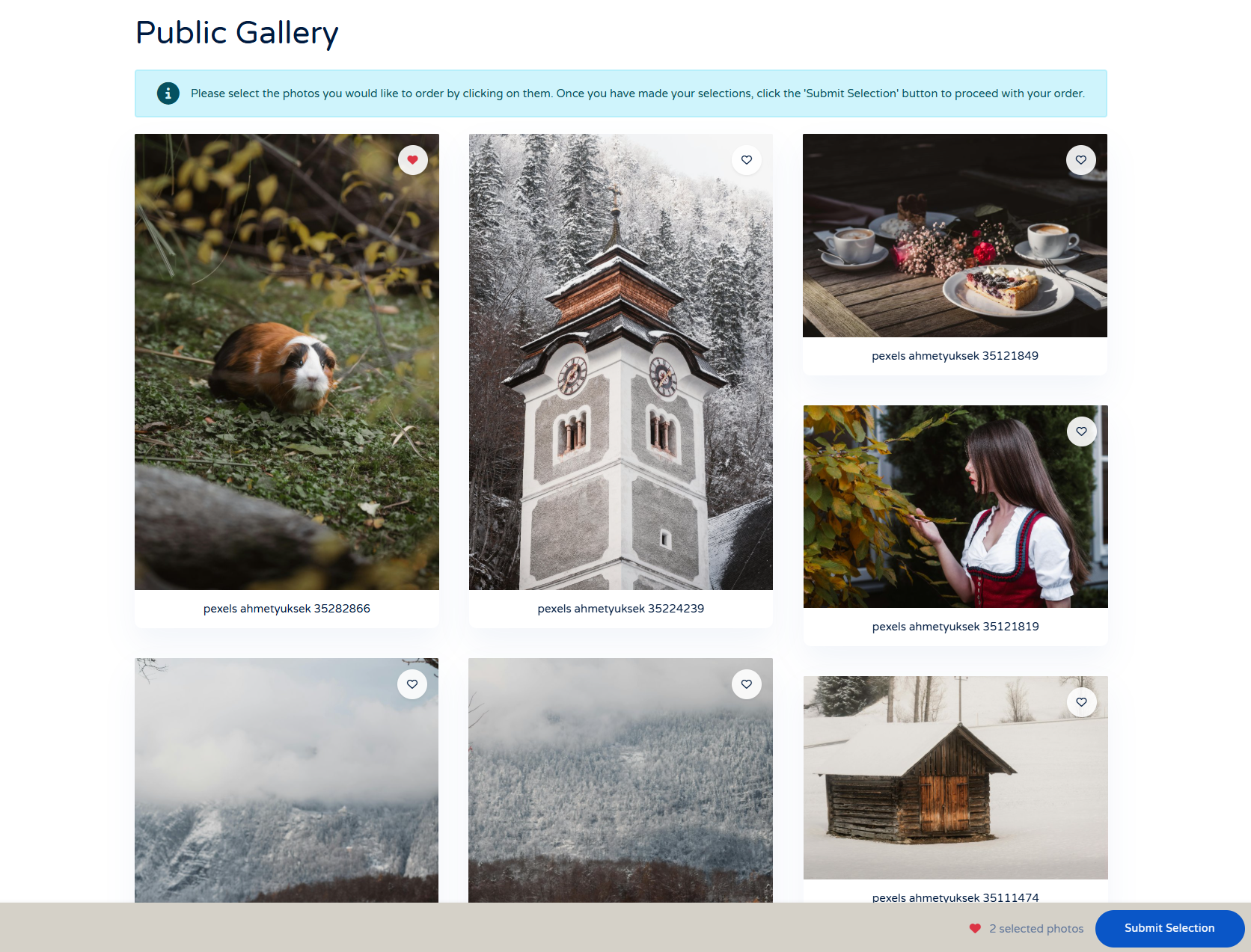
Client Response Gallery frontend

New in v1.1.0: Adobe Lightroom plugin and HTTP API

Export photos straight from Lightroom into a gallery on your site. Create galleries without leaving your editing flow. Plus min/max selection limits, custom warning messages, and a selection preview step for your clients.

★★★★★

I tested several Joomla gallery extensions before finding Client Response Gallery, and this one stood out immediately. The workflow is intuitive, performance is excellent, and the gallery looks beautiful on both desktop and mobile devices. What we especially appreciate is the smooth communication process with clients, it saves us a lot of time during photo selection projects. A fantastic extension with great potential for professional photographers."

Silvie - silvisual.nl
★★★★★

"Client Response Gallery has completely transformed the way we deliver photo selections to our clients. The interface is clean, fast, and very easy to use, even for non-technical customers. My clients love being able to mark their favorite images and send feedback directly from the gallery. Setup in Joomla was straightforward and the extension feels very polished and professional. Highly recommended for photographers and creative agencies looking for a modern client proofing solution."

Yarize - ymphotography
Why photographers switch

Stop paying every month for something you already own.

Pixieset, Pic-Time, ShootProof, Zenfolio, CloudSpot. They all charge a monthly fee to host the photos you shot, on a domain that is not yours, with a price that goes up every year. Client Response Gallery lives inside your Joomla site, runs on your hosting, and never asks for another payment.

No subscriptions

One-time payment

Pay once. Use it on a single client website, ten client websites, or every site you ever build. The license is unlimited.

Privacy first

Your data, your domain

Photos live on your hosting. Galleries open under your domain. Client emails do not leave your server. Full GDPR control without a Data Processing Agreement to sign.

No caps

Unlimited everything

Unlimited galleries, unlimited photos, unlimited clients. No storage tier to outgrow. The only limit is the disk space on your own server.

vs. the alternatives

How Client Response Gallery compares to Pixieset, Pic-Time and ShootProof.

The popular SaaS proofing platforms are polished, but they come with monthly bills, storage caps, and platform lock-in. Here is how the numbers look when you do the math over a single year.

  Client Response Gallery Pixieset / Pic-Time / ShootProof
Pricing model €35 one-time €15 to €50 per month, every month
Galleries Unlimited Capped on lower tiers, unlocked at higher tiers
Storage As much as your hosting allows Tier-based (3 GB, 100 GB, unlimited)
Where photos live Your own server, your own domain Their cloud, their subdomain or branded URL
Branding 100% your brand, your template, your CSS Branded with platform logo on lower plans
Client data & GDPR Stays in your Joomla database Processed by a US or third-country provider
Sales commission Zero Often 0% to 15% on print sales
Lightroom plugin Included Usually plan-dependent or paid add-on
API access Included, with full documentation Limited or higher-tier only
Languages All Varies, often English-first

Pricing of competitors based on publicly listed plans on their websites. Plans and limits change frequently.

A closer look

Five features that actually matter when you shoot for clients.

Built from the ground up for the way photographers really work. Cull in Lightroom, hand it off to your client, get a clean order back in your inbox.

NEW

Adobe Lightroom Classic plugin: export straight from Lightroom to your gallery.

Stop wrestling with FTP clients and browser uploaders. The Client Response Gallery plugin adds a native export provider to Lightroom Classic. Cull and edit your shoot as you normally would, then pick "Client Response Gallery" in the Export dialog, choose the target gallery, and click Export. Lightroom renders each photo and pushes it straight into your Joomla site.
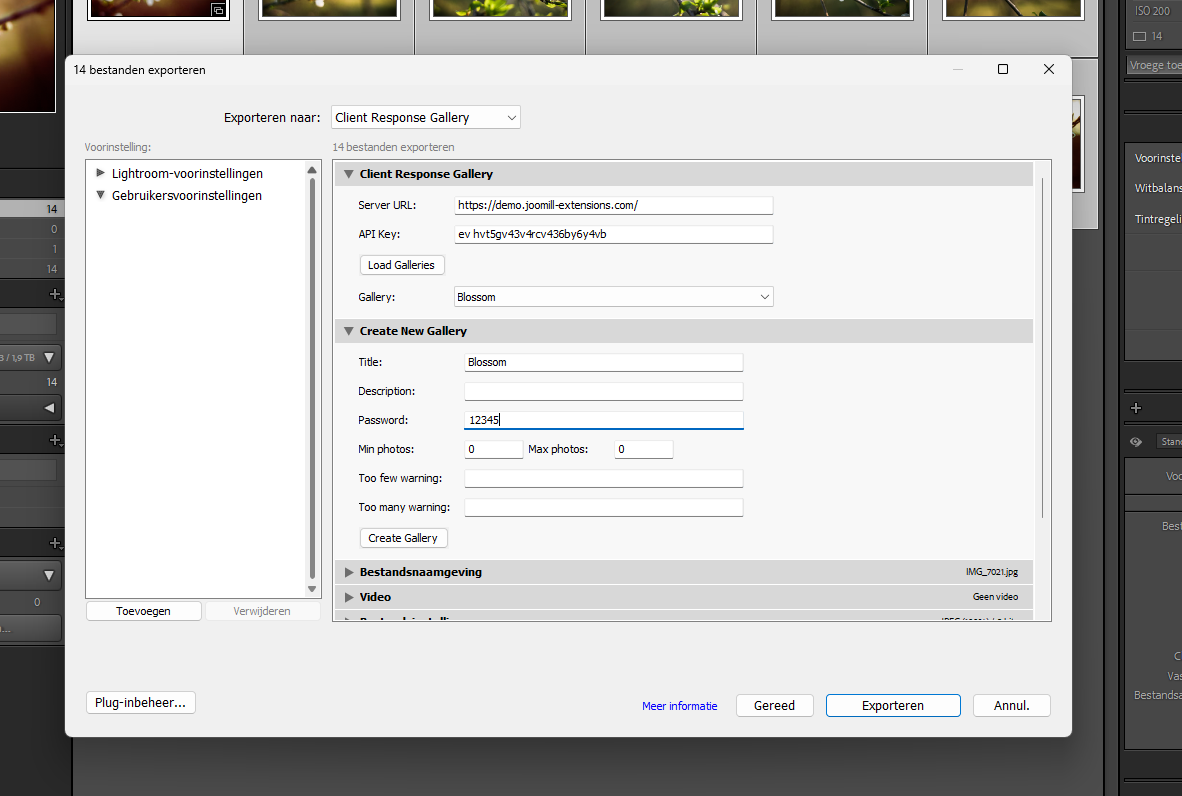
  • Create new galleries from inside Lightroom (no need to open Joomla)
  • Set title, description, password, and selection limits before exporting
  • Watermarks are applied server-side using your component settings
  • Progress bar with per-file feedback and an end-of-export summary
  • Works on Windows and macOS, Lightroom Classic 6.0 or later
Adobe Lightroom Classic plugin for Client Response Gallery
Client photo selection interface with heart icons

Client experience

Photo selection that feels like Instagram.

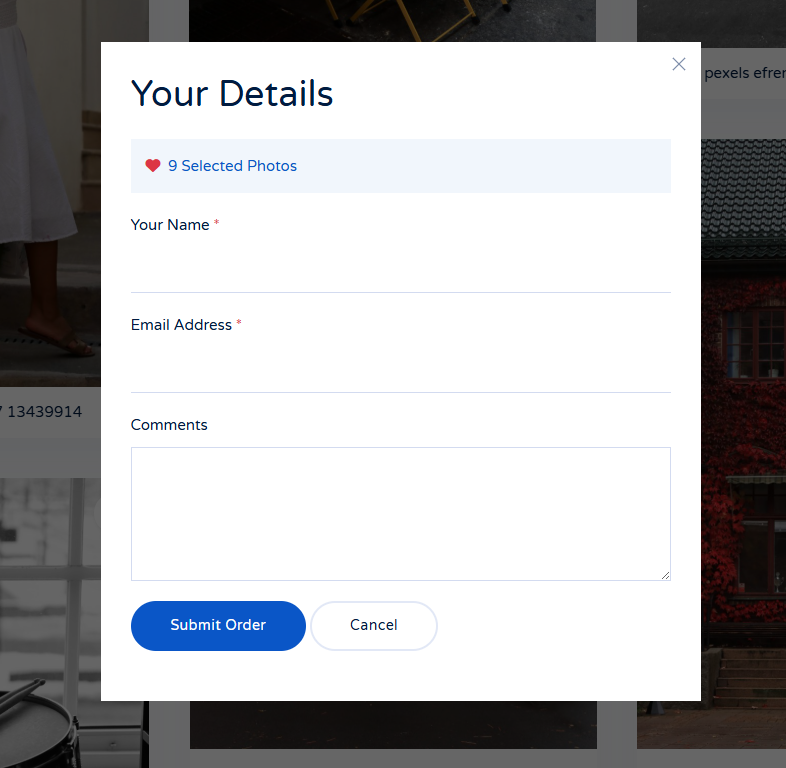
Your clients pick favourites by tapping a heart on each photo. No log-in, no app to install, no spreadsheet of file numbers to fill in. When they are happy with their selection, they submit, and the system emails a clean summary to you and to them with thumbnails of every chosen photo.

  • Minimum and maximum selection limits, set globally or per gallery
  • Custom warning messages with {min} and {max} placeholders
  • Warning position: above the photos, below them, or in the sticky selection bar
  • Optional selection preview step that shows clients their picks before submitting
  • Previous orders can be shown, useful when family members each pick from the same shoot

Backend workflow

Batch upload, resize, and watermark all in one drag-and-drop.

Drag a folder onto the uploader and walk away. Each photo is resized to your maximum width, recompressed to the quality you set, watermarked with your text or logo, and saved to the gallery folder. No external software, no manual exports, no Photoshop action to maintain.

  • JPG, PNG, and WebP accepted, validated on actual file content (not just the extension)
  • Max width and JPEG quality fully configurable (defaults: 1920 px, 85%)
  • Text watermarks with custom font, size, colour, position, and opacity
  • Image watermarks automatically scaled to one third of the photo width
  • Nine watermark positions, from top-left corner to centre to bottom-right
Batch upload interface with drag and drop
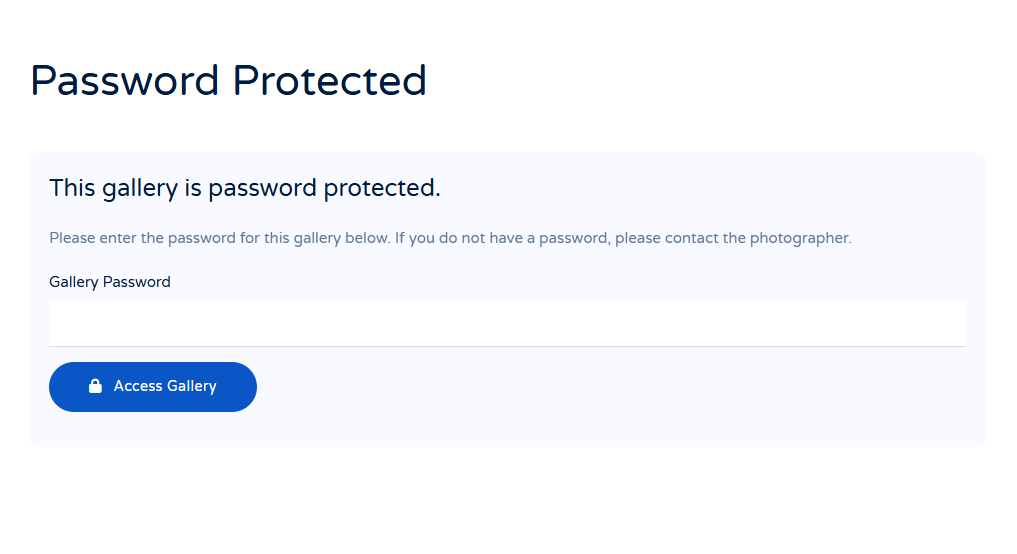
Password protected gallery access screen

Privacy

Password-protected galleries, unlimited and forever.

Every gallery gets its own password. Wedding photos do not show up in Google. Boudoir shoots stay between you and the couple. Once a client logs in, their access is remembered for as long as you configure the cookie duration to be.

  • Unique password per gallery, set in the backend or via the Lightroom plugin
  • Cookie-based session, length configurable (default: until end of session)
  • Cookie is cleared automatically after a client submits their order
  • Galleries are unlisted by design: no public index unless you add one
  • SEF-friendly URLs based on the gallery alias

Workflow

Two emails sent automatically. Yours and your client's.

When a client submits their selection, two confirmation emails go out instantly. The client gets a friendly summary of the photos they chose. You get the same summary plus their contact details, ready to drop into your retouching queue. Both templates are fully editable.
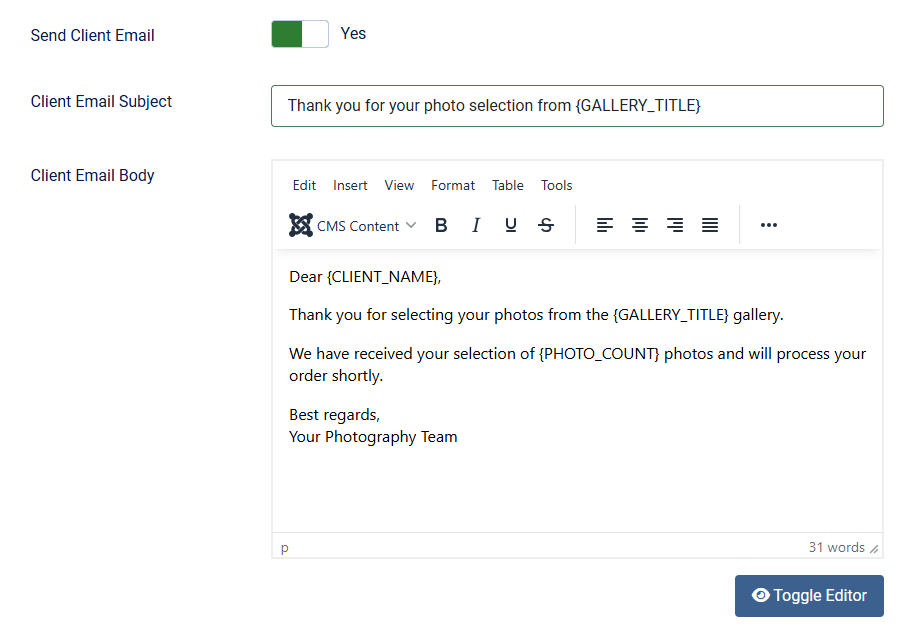

  • Placeholders for client name, email, phone, message, gallery title, photo count, and a clickable list of selected photos
  • Separate templates for client and photographer emails
  • BCC address support, so a second team member or your CRM inbox gets notified too
  • Each email type can be toggled on or off independently
  • Photographer email is set as reply-to in client emails, keeping the thread on your side
Email configuration with placeholders
Everything else inside the box

Every option a proofing platform should have, and none of the ones you do not need.

Tuned for working photographers, not for marketing screenshots. Each setting maps to a real decision you make on a real shoot.

Custom email templates

Edit subject and body for both client and photographer emails. Seven placeholders cover everything from client name to a clickable photo list.

Configurable confirmation form

Choose which fields the client must fill in: name, email, phone, and message can each be required, optional, or hidden.

Thank You page control

Custom thank-you message, configurable return link, and optional auto-redirect to your shop or booking page.

Gallery columns 1 to 6

Match the layout to the photo style. Three columns for portraits, two for fine art, six for contact-sheet proofing.

UIkit or Bootstrap

Pick the CSS framework that matches your template. Both variants are kept in sync, both look polished out of the box.

Custom CSS field

Built-in field for the small tweaks every photographer wants. No template override needed.

HTTP API

Authenticated API for creating galleries, uploading photos, and integrating with your own tools. Used internally by the Lightroom plugin.

Photo thumbnails in admin

The backend photo list shows thumbnails, not just filenames. Spot the photo you want to delete or move at a glance.

Delete-and-clean

Optional setting to remove the media files and folder when a gallery is deleted. Keeps your hosting tidy.

Watermark demo gallery

A live demo gallery on our site shows every watermark option, so you can see the result before you ship the shoot.

Six languages out of the box

English, Dutch, German, French, Spanish, and Italian translations included. Joomla picks the right one automatically.

1 year of updates & support

Bug fixes, new features, and direct email support included for a full year. Renew only if you want the next 12 months.

Jeroen Moolenschot
Personal Support

You email Jeroen. Jeroen emails you back.

Joomill — developer, Joomla since 2006, JED Listing Expert
"I built this module for my own clients in 2009 and I still ship every update myself. If you hit something weird, send me a message. No tier-1 bot, no escalation queue, no waiting three days for a copy-paste reply."

< 24h

Average reply on weekdays

17 years

Maintaining this module

100%

Replies from the developer
Self-hosted, privacy-first

Your clients trust you with their photos. Don't pass that trust along to a third party.

When a wedding gallery sits on a US-based SaaS platform, your client's photos cross borders, hit third-party CDNs, and live in a database you do not control. With Client Response Gallery, the photos never leave your server, the client emails never leave your domain, and the gallery URL is yours.

No US data transfers

If your Joomla site is hosted in the EU, all photo and client data stays in the EU. No Schrems II headaches.

No DPA needed

You are the controller and the processor. One less Data Processing Agreement to sign and store.

No platform lock-in

If you ever move on, your photos are still on your disk and your client data is still in your database. Nobody to negotiate an export with.

The Joomla photo proofing platform

One license, unlimited sites · Personal support from the developer
Frequently asked

Questions photographers ask before they buy.

Do I need to be a developer to use this?

No. If you can install a Joomla extension, you can run Client Response Gallery. There is no code to write. The Adobe Lightroom plugin is configured in two text fields (server URL and API key). The API is available for power users but it is optional.

Can I use the component on my client's website too, not just my own?

Yes. The license is unlimited installations. You can install it on every photography site you build, including your client's, with the same purchase.

What happens after 1 year?

The component keeps working forever. After 12 months you stop receiving updates and email support, unless you renew. Renewal is optional and gives you another 12 months of updates and support.

Will my hosting handle large weddings (2,000+ photos)?

If your hosting can serve a regular photo gallery with JPEGs, it can serve Client Response Gallery. The component resizes uploads down to a web-friendly width (default 1920 px) and compresses them, so storage and bandwidth per photo stay reasonable. Watermarking and resizing happen at upload time, not on every page view.

How does the Adobe Lightroom plugin connect to my site?

You enable the API in the component settings, set an API key, and enter the same key into the Lightroom plugin together with your site URL. Lightroom then uploads the rendered JPEGs over HTTPS using a standard X-API-Key header. The plugin requires Lightroom Classic 6.0 or later on Windows or macOS. Lightroom CC (cloud) and Lightroom mobile are not supported.

Can my client browse multiple times before submitting?

Yes. The component uses a cookie to remember the favourites the client picked. They can come back the next day, add or remove a few photos, and submit only when they are happy. The cookie is cleared automatically after they submit their final selection.

What if I want a different layout for the gallery page?

The frontend templates support both UIkit and Bootstrap out of the box. Pick the one that matches your Joomla template. For deeper changes there is a Custom CSS field in the component settings, and the views can also be overridden via standard Joomla template overrides.

Does it handle GDPR?

The data the client submits (name, email, phone, message, selected photos) is stored in your own Joomla database on your own hosting. You decide retention and deletion. There is no third-party processor involved, so you only have to declare your own site in your privacy policy.

Can I see a demo first?

Yes. demo.joomill-extensions.com/client-response-gallery shows the full client flow. There is also a watermark demo gallery where you can see every watermark option side by side.